Automation for sales and order management
Your customers' purchase orders arrive by email, each in its own format. We interpret them, validate them and enter the order wherever you need it, with no manual keying.
Sound familiar?
- Every customer sends orders in a different format, and no two look alike.
- The same material shows up with different descriptions and units depending on the customer.
- Every material, quantity or price error gets paid for later, in shipping and billing.
- When volume rises, the only available answer is adding people.
What we can automate
Customer order entry
Receives the purchase order as a PDF, Excel, XML or image file, extracts the data, validates it and enters the order.
Credit memo processing
Reads and validates the request against system data, and generates the document.
Order status and notifications
Checks each order's status in the system and automatically notifies the right people.
How we solve it
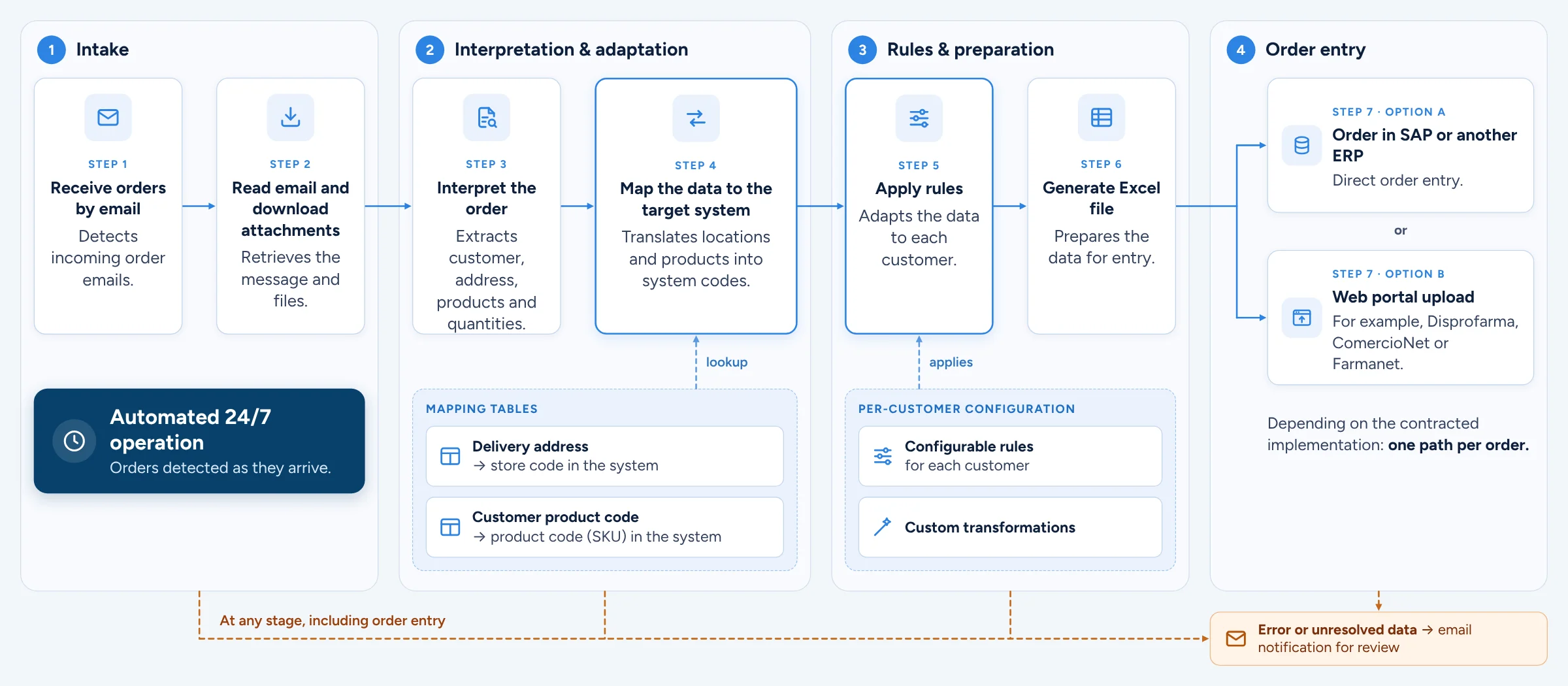
- 1
Customer
Sends the order the way they do today.
- 2
Intake
By email, to a dedicated mailbox.
- 3
AI extraction
PDF, Excel, XML or image, with no fixed templates.
- 4
Validations
Customer, material, price, quantity and units.
- 5
Order entry
In SAP, another ERP, a web platform or an import file.
- 6
Traceability
Status of every order and an exceptions report.
What the order automation does
- Receives orders in a dedicated email mailbox. If one arrives by WhatsApp or another channel, simply forward it to that mailbox.
- Interprets the document, whether it's a PDF, Excel, XML, image or another format, without relying on a fixed template per customer.
- Extracts the data using document processing and artificial intelligence: customer, materials, quantities, prices, dates and terms.
- Validates against master data and commercial rules: that the customer exists, the material is enabled, the price matches the current price list and the quantity makes sense.
- Converts units when needed, for example from cases to units, applying the right equivalence for each material.
- Creates the order wherever it's needed, using the integration mechanism your environment allows.
- Sets exceptions aside. Anything that fails a validation isn't half-loaded: it's flagged with its cause in an actionable report, without holding up the rest of the batch. Once corrected, it's reprocessed without starting over.
- Keeps a record of every document: what was processed, when, with what result and which order it created.
Where the order gets entered
We don't limit the solution to one system. The order can be created in SAP, in another ERP, on web platforms such as Disprofarma, ComercioNet or Farmanet, or delivered as a structured file to import into the tool you already use.
In SAP, order creation can be handled through BAPI, API, Service Layer or DI API on Business One, or SAP GUI Scripting when no interface is enabled. We define the destination and the mechanism during process discovery, together with your IT team.
What kind of company it fits
We've implemented it in consumer goods, where order volume is highest and most constant, but the solution doesn't depend on the industry. It applies to any company that receives many purchase orders in formats it doesn't control: distribution, manufacturing, pharma, retail, logistics.
From input to outcome, with no manual steps
Intake
The order arrives by email at a dedicated mailbox.
Extraction
AI reads PDF, Excel, XML or image files, with no fixed templates.
Validation
Customer, material, price, quantity and units against your master data.
Entry
Order in SAP, another ERP, a web platform or an import file.
Exceptions and record
Whatever doesn't validate is set aside with its cause. Everything is logged.
Systems we integrate with
We work on top of the systems your company already uses. When no integration is available, we operate the system the way a user would or generate files for import. How we integrate with SAP.
Benefits for your operation
- Up to 90% less operating time per order, depending on volume and format variety (benchmark from the production case).
- Your team stops transcribing and starts reviewing exceptions.
- Fewer material, quantity and price errors, and with them less downstream rework.
- A shorter Order-to-Cash cycle, because the order goes in as soon as it arrives.
- More volume processed without growing the team, even at peak times.
- Anyone can say what status an order is in without digging through the ERP.
Does your team spend hours entering orders?
Tell us how the process works today and we'll tell you whether it can be automated and where to start.
Or email us at [email protected]